

Categories
Tags
Agent Mode Astro Auto Accept Automation Camping changelog Chat clear CLI Code Actions Codex compact Component Design Configuration context Context Copilot copy Ctrl+S CUDA Cursor Day Trip delegate diff Dynamic Routing Editor Error Error Fix Error Handling experimental Gemini git GitHub GitHub Copilot Google Hiking Hot Springs init Installation Iwate Prefecture Kobe Linux Localization Mac Mention Meteor Shower Mode Switching model Nara Prefecture NES NoAdapterInstalled Node.js nvm OpenAI params plan PowerShell Prompt props Public Key Authentication Python Redirect Reference Rename research rewind SEO Settings share Shell Execution Shift+Tab Shortcut SSH SSH config ssh-copy-id Stargazing Static Site streamer-mode Student undo Update usage Visual Studio VS Code VS2026 Windows WSL
184 words
1 minutes
Fix for Visual Studio 2026 Copilot Window Not Opening
Symptoms
When trying to open Copilot / Conversations windows in Visual Studio 2026:
- “An exception occurred trying to create the content for this frame”
- Error in ActivityLog.xml saying
Microsoft.VisualStudio.Copilot.UI.IViewModelServicescannot be found
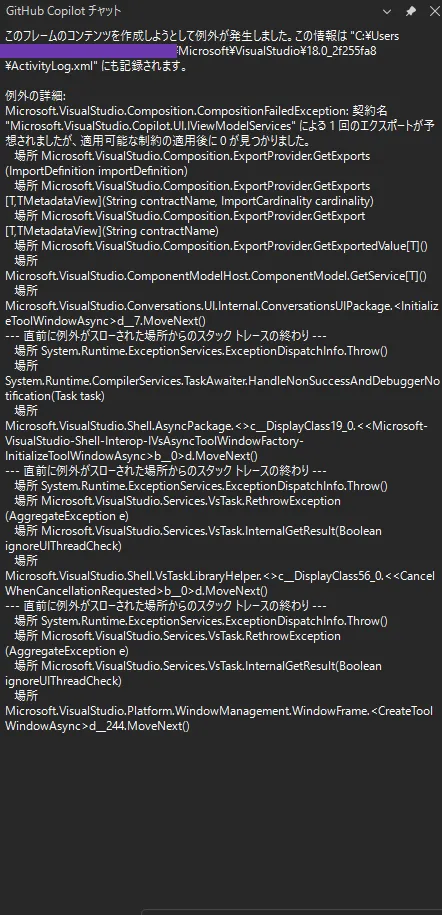
The window fails to display properly. Here’s a memo of the cause and solution when I fixed it.
Cause
Visual Studio 2026 includes Copilot functionality by default, but
if you migrated settings/extensions from Visual Studio 2022:
- Old GitHub Copilot / Copilot Chat extensions from VS2022 remain
- These old extensions conflict with the built-in Copilot
As a result, services for the Copilot UI cannot be found, causing errors.
Solution
Disable or uninstall old Copilot extensions
Launch Visual Studio 2026
From the menu, open
[Extensions] → [Manage Extensions]Select [Installed] on the left side
In the search box at the top right, search for these keywords one by one:
CopilotGitHub CopilotCopilot Chat
Look for extensions like:
- Copilot / Copilot Chat extensions manually installed during VS2022
- Copilot-related extensions that are clearly duplicates
Select problematic extensions and either:
- To monitor first: [Disable]
- To completely remove: [Uninstall]
After disabling/uninstalling extensions,
Restart Visual Studio 2026
Notes
- VS2026 includes Copilot by default, so
Copilot extensions installed for VS2022 are generally unnecessary - If unsure which to remove, first try
disabling “clearly duplicate Copilot extensions” and monitor the results
Fix for Visual Studio 2026 Copilot Window Not Opening
https://naonao-na.com/en/posts/visualstudio2026-copilot-error/