

Categories
Tags
Agent Mode Astro Auto Accept Automation Camping changelog Chat clear CLI Code Actions Codex compact Component Design Configuration context Context Copilot copy Ctrl+S CUDA Cursor Day Trip delegate diff Dynamic Routing Editor Error Error Fix Error Handling experimental Gemini git GitHub GitHub Copilot Google Hiking Hot Springs init Installation Iwate Prefecture Kobe Linux Localization Mac Mention Meteor Shower Mode Switching model Nara Prefecture NES NoAdapterInstalled Node.js nvm OpenAI params plan PowerShell Prompt props Public Key Authentication Python Redirect Reference Rename research rewind SEO Settings share Shell Execution Shift+Tab Shortcut SSH SSH config ssh-copy-id Stargazing Static Site streamer-mode Student undo Update usage Visual Studio VS Code VS2026 Windows WSL
187 words
1 minutes
Fastest Way to Install Node.js 22 with nvm on Mac
Table of Contents
Why nvm?
- Instant switching: Use
nvm use 22or.nvmrcto lock versions per project. - No sudo needed: Installs in user space, keeping your system Node clean.
- Reproducible: Share
.nvmrcso everyone uses the same Node version.
Installation Steps
1) Install nvm (Official Installer)
curl -o- https://raw.githubusercontent.com/nvm-sh/nvm/v0.40.3/install.sh | bashCheck GitHub for the latest command.
After installation, verify initialization in ~/.zshrc. If missing, add:
export NVM_DIR="$HOME/.nvm"
[ -s "$NVM_DIR/nvm.sh" ] && . "$NVM_DIR/nvm.sh"
Then reload:
source ~/.zshrcTo check for hidden files:
ls -a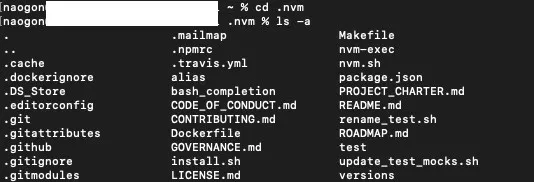
2) Install and Use Node.js 22
nvm install 22
nvm use 22
node -v   # v22.x
npm -v    # 10.x+
(Optional) Set 22 as default:
nvm alias default 223) Lock Version Per Project
echo "22" > .nvmrc
nvm use   # Automatically selects v22 in this directory
Common Issues
nvm: command not found→ Check~/.zshrcinitialization and runsource ~/.zshrc.- Not switching to v22 → Run
which nodeto see if Homebrew’s Node takes priority. If needed,brew uninstall node. - Global npm not working → Verify
npm prefix -gbin is in PATH (only if needed).
Final Notes
It would be easier if Homebrew installation worked, but nvm doesn’t seem to support it. Manual setup is a bit tedious, but it’s the way to go.
Fastest Way to Install Node.js 22 with nvm on Mac
https://naonao-na.com/en/posts/nodejs-install-nvm-mac/