

Categories
Tags
Agent Mode Astro Auto Accept Automation Camping changelog Chat clear CLI Code Actions Codex compact Component Design Configuration context Context Copilot copy Ctrl+S CUDA Cursor Day Trip delegate diff Dynamic Routing Editor Error Error Fix Error Handling experimental Gemini git GitHub GitHub Copilot Google Hiking Hot Springs init Installation Iwate Prefecture Kobe Linux Localization Mac Mention Meteor Shower Mode Switching model Nara Prefecture NES NoAdapterInstalled Node.js nvm OpenAI params plan PowerShell Prompt props Public Key Authentication Python Redirect Reference Rename research rewind SEO Settings share Shell Execution Shift+Tab Shortcut SSH SSH config ssh-copy-id Stargazing Static Site streamer-mode Student undo Update usage Visual Studio VS Code VS2026 Windows WSL
256 words
1 minutes
GitHub Copilot CLI Installation Guide for Mac
Prerequisites
- Active GitHub Copilot subscription (Individual / Business / Enterprise)
- macOS (zsh)
- Node.js 22+ / npm 10+
- Network access to
github.com
Table of Contents
Node.js Setup
Skipped in this guide. If not installed yet, please check the Node.js installation guide.
Installation
Run this in your terminal:
npm install -g @github/copilot
copilot --version
Authentication
Login via copilot
copilot
# When prompted:
/copilot> /login
Follow the browser authentication instructions.
If gh is installed, you may be automatically logged in via environment variables.
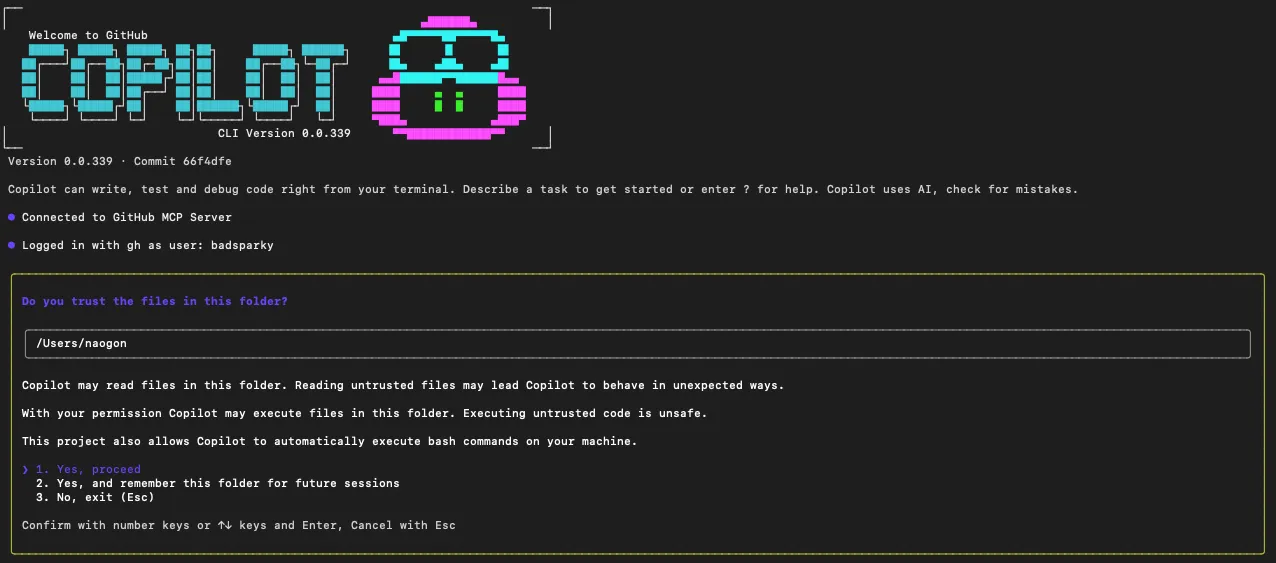
Reusing gh token
export GH_TOKEN=$(gh auth token)
# or
export GITHUB_TOKEN=$(gh auth token)
Note: Personal PATs are no longer supported (as of October 2025) GitHub
Usage
Try copilot in any repository:
/copilot> How's it going? Summarize in MDUseful slash commands:
/copilot> /model          # Switch model
/copilot> /files add .    # Add files/folders to context
/copilot> /undo           # Undo last action
By default, it shows diffs and asks for approval before executing.
Update / Uninstall
Managed via npm, so it’s simple:
# Update (same command)
npm install -g @github/copilot

# Uninstall
npm uninstall -g @github/copilot
Troubleshooting
node -vbelow 22 /npm -vbelow 10 → Re-runnvm install 22 && nvm use 22.copilotnot found → Addnpm prefix -gbin to PATH.- Can’t use with enterprise/school account → Copilot CLI may be disabled by organization policy. Contact your admin.
gh auth tokendoesn’t work → Checkecho $GH_TOKEN/echo $GITHUB_TOKENis set. Try restarting shell orsource ~/.zshrc.
Premium Requests
- Copilot CLI uses “1 prompt = 1 Premium request” (regardless of /model selection).
- Count resets monthly on 1st at 00:00:00 UTC. Limits vary by plan type.
- Check usage in GitHub account settings (Usage/Entitlements screen).
Unlike VS Code which has free models, CLI doesn’t. Watch your LLM budget!
GitHub Copilot CLI Installation Guide for Mac
https://naonao-na.com/en/posts/github-copilot-cli-install-mac/