

I develop with:
- Visual Studio 2022
- CUDA Toolkit (11/12 series)
When Visual Studio 2026 was released, I thought “Great, let’s migrate to VS2026!”
It failed miserably.
Table of Contents
What Happened
CUDA projects that opened fine in VS2022 now error out in VS2026:
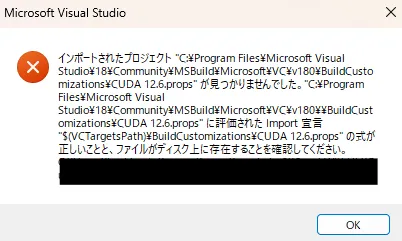 The familiar error that appears when CUDA versions don’t match.
Other issues include:
- CUDA-related build tasks and properties not found, causing build errors
- CUDA templates and configuration files (
.props, etc.) missing from VS2026 - CUDA Toolkit installer doesn’t recognize VS2026 as a valid “integration target Visual Studio”
The Cause
At the time, NVIDIA’s official documentation (CUDA Installation Guide for Windows and cuDNN support matrix) only listed:
- Visual Studio 2019
- Visual Studio 2022
Visual Studio 2026 was not yet officially supported.
On NVIDIA Developer Forums, there were threads asking:
- “CUDA Toolkit doesn’t detect VS2026 during installation”
- “When will VS2026 be supported?”
Support was still pending for a while.
🎉 Update: CUDA 13.2 Now Officially Supports VS2026!
As of CUDA 13.2, Visual Studio 2026 (MSVC 195x / VS 2026 18.x) is officially supported.
The NVIDIA CUDA Installation Guide for Windows compiler support table (Table 1) now lists:
| Compiler | IDE | Native x86_64 |
|---|---|---|
| MSVC Version 195x | Visual Studio 2026 18.x | ✅ Supported |
| MSVC Version 193x | Visual Studio 2022 17.x | ✅ Supported |
| MSVC Version 192x | Visual Studio 2019 16.x | ✅ Supported |
Note: Support for Visual Studio 2015 was deprecated in CUDA 11.1, and Visual Studio 2017 was deprecated in 12.5 and dropped in 12.9.
Resolution
Update CUDA Toolkit to 13.2 or later to get official VS2026 support.
You can download the latest CUDA Toolkit from https://developer.nvidia.com/cuda-downloads.