

Categories
Tags
Astro Camping CLI Codex Component Design Configuration Copilot CUDA Cursor Day Trip Dynamic Routing Editor Error Error Fix Error Handling Gemini git GitHub GitHub Copilot Google Hiking Hot Springs Installation Iwate Prefecture Kobe Linux Mac Meteor Shower Nara Prefecture NoAdapterInstalled Node.js nvm OpenAI params PowerShell props Public Key Authentication Python Redirect SEO SSH SSH config ssh-copy-id Stargazing Static Site Student Visual Studio VS Code VS2026 Windows WSL
142 words
1 minutes
CUDA Not Working with Visual Studio 2026
I develop with:
- Visual Studio 2022
- CUDA Toolkit (11/12 series)
When Visual Studio 2026 was released, I thought “Great, let’s migrate to VS2026!”
It failed miserably.
Table of Contents
What Happened
CUDA projects that opened fine in VS2022 now error out in VS2026:
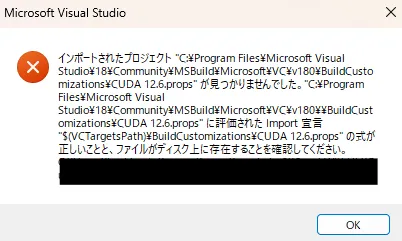 The familiar error that appears when CUDA versions don’t match.
Other issues include:
- CUDA-related build tasks and properties not found, causing build errors
- CUDA templates and configuration files (
.props, etc.) missing from VS2026 - CUDA Toolkit installer doesn’t recognize VS2026 as a valid “integration target Visual Studio”
The Cause
According to NVIDIA’s official documentation (CUDA Installation Guide for Windows and cuDNN support matrix):
- Visual Studio 2019
- Visual Studio 2022
Sadly, Visual Studio 2026 is not yet officially supported.
On NVIDIA Developer Forums, there are threads asking:
- “CUDA Toolkit doesn’t detect VS2026 during installation”
- “When will VS2026 be supported?”
Support is apparently still pending.
Current Workaround
The most stable approach is to keep using Visual Studio 2022 for now.
References
CUDA Not Working with Visual Studio 2026
https://naonao-na.com/en/posts/cuda-vsstudio-2026-fail/